TOP CLASS ARTICLE DIRECTORY WITH HIGH DA/PA (DO-FOLLOW ONLY) 1. https://uberant.com/users/tzehua/ (DA=50) 2. Insert other links copy from Lenovo notebook at home. I recalled other free directories inside my Bookmark folder. 3. xxxx
Posts
What To Do First When Embarking on First SEO Project?
FIRST DAY TASK: NOTE: Perform all following task within the first 5 to 7 days (1st week only). 8th day onwards shall focusing on backlink creation (paid or manual). * For productive work and organization purpose, recommended to insert all Keyword Research Analysis or Long Tail Keywords in Google Doc (Spreadsheet). Make sure keyword list is finalized so no need to edit permalinks again in future (to avoid wasted built backlinks on edited permalinks few months down the road). 1. For Recruitment Agency Project, I've requested for 2 tools below: a) Ahrefs 7 Day Trial - paid b) Ranker X subscription - paid c) Requested for WP-Admin login (to create new blog post, install GTM, Analytics, MonsterInsights, LuckyOrange if have more license, adjust Permalink settings, new blog post for URL optimization based on keyword, WebsiteSpeed Optimization etc) 2. Prepare Google Doc to save all login information for above (a) and (b) and (c). * VERY IMPORTANT: CHECK YOUR SPAM FOLDER ...
Autoptimize Settings with WP Super Cache Video Tutorial * Found this great free tutorial on https://support.stylemixthemes.com/knowledge How to Speed up Your WordPress Site with Autoptimize and WP Super Cache AND https://support.stylemixthemes.com/how-to-improve-your-website-speed-performance-with-wp-speed-of-light *Another great way to earn a DA=40 DO-FOLLOW backlink is to buy one of the awesome themes from StyleMixThemes and submit post inside their Theme forums. Need a license key for the themes before can post inside forum. Examples: https://support.stylemixthemes.com/forums/topic/consulting-theme-elementor https://support.stylemixthemes.com/forums/topic/footer-section-problem https://support.stylemixthemes.com/forums/topic/thumbnail-size-adjustment https://support.stylemixthemes.com/index.php/forums/topic/consulting-theme-elementor https://support.stylemixthemes.com/index.php/forums/topic/footer-section-problem https://support.stylemixthemes.com/index.ph...
Autoptimize & Litespeed Best Settings to Obtain > 80 Score for MOBILE SPEED TEST (Pagespeed Insights)

PART 1: FONTS * Remember to select Remove Google Fonts inside Autoptimize settings! VERY IMPORTANT! COPY ENTIRE SETTINGS BELOW FOR "EXTRA" tab of this plugin: When running test on Google PageSpeed Insights, please take note of the following: * Depending on Google's recommendation (don't copy these lines bulat-bulat ya...), make sure to insert the following <preload> line into Theme's header.php <link rel="preload" href="wp-content/themes/astra/assets/fonts/astra.woff" as="fonts"> <link rel="preload" href="wp-content/plugins/monarch/css/fonts/monarch.ttf" as="fonts"> <link rel="preload" href="wp-content/plugins/elementor/assets/lib/font-awesome/webfonts/fa-regular-400.woff2" as="fonts"> <link rel="preload" href="wp-content/plugins/elementor/assets/lib/eicons/fonts/eicons.woff2?5.4.0" as="fonts"> ...
IMPORTANT GTMETRIX SETTINGS (NOT WHAT YOU THINK!)
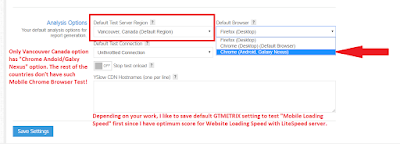
* The outcome of the website speed test is actually for "Website", Not "Mobile Website". - Login to your FREE account, and save the settings as follow. See the RED COLOUR NOTES for my comments! * Remember to visit all website optimization tools and see if their settings is same like GTMETRIX, or run website loading speed test on DESKTOP or MOBILE DEVICE first!
Which one is correct? Using /thank-you or /thank-you/ for Goal conversion page...
Check and validate which one is correct? Using /thank-you or /thank-you/ for Goal conversion page... Check this on Sunday (48 hours after completed goal URLs)
Useful Free Services / Free Tools e.g. Website Duplicate Checker
1. Check Duplicate Content (using URL address) and Free SEO Backlinks checker: SEO/ backlinks: https://www.duplichecker.com/seo-backlink-tools Duplicate/Plagiarism Content: https://www.duplichecker.com/